Part 2: System V Shared Memory
This section covers the System V shared memory API—the functions you'll use to create, attach to, and manage shared memory segments. By the end, you'll understand how to set up a communication channel between processes.
Prerequisites:
Make sure you've read the Core Concepts section first. The full
implementation is in the code folder.
2.1 What is Shared Memory?
The Concept
Shared memory is a region of memory that multiple processes can map into their own address spaces simultaneously. Unlike other IPC mechanisms (like pipes or message queues) that require the kernel to copy data between processes, shared memory provides direct access—processes read and write the same bytes in RAM.
Think of it like a whiteboard in a shared office: Instead of passing notes back and forth (message passing), you simply write on the whiteboard and others can read it immediately. No copying, no intermediary—just direct access.
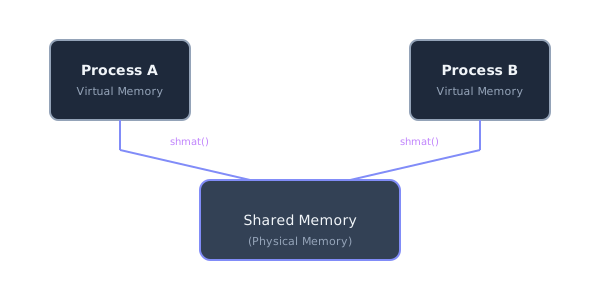
Both processes map the same physical memory to different virtual addresses
Why Shared Memory is the Fastest IPC:
Shared memory is significantly faster than other IPC mechanisms because:
- No data copying — With pipes or message queues, data is copied from the sender's buffer to the kernel, then from the kernel to the receiver's buffer (two copies!). With shared memory, there's zero copying—both processes access the same bytes.
- Direct access — Processes read and write directly to the shared region using normal memory operations (like pointer dereferencing)
- Memory-mapped — Uses the CPU's virtual memory hardware, which is extremely fast
The Tradeoff: You Need Synchronization
Shared memory's speed comes with a responsibility: you must manually synchronize access. If two processes write to the same location simultaneously, you get data corruption. That's why we pair shared memory with semaphores—the semaphores protect the shared memory from race conditions.
2.2 The Shared Memory Lifecycle
Working with shared memory involves four distinct phases:
- Create or Access — Use
shmget()to create a new segment or get a handle to an existing one - Attach — Use
shmat()to map the segment into your process's address space - Use — Read and write through the pointer returned by
shmat() - Detach and Remove — Use
shmdt()to unmap andshmctl()to delete
Required Headers:
#include <sys/ipc.h>   // For IPC_CREAT, IPC_RMID, key_t
#include <sys/shm.h>   // For shmget, shmat, shmdt, shmctl
Note: You'll also typically include <errno.h> and
<string.h> for error handling with errno and
strerror().
2.3 shmget() — Create or Access Shared Memory
The shmget() function creates a new shared memory segment or retrieves the ID of an
existing
one.
int shmget(key_t key, size_t size, int shmflg);Parameters Explained:
key— A unique identifier that processes use to find the same segment. Think of it like a phone number—any process that knows the number can call (access) the segment. Common choices:IPC_PRIVATE— Creates a private segment (useful only for related processes like parent-child)- A user-defined integer like
777or0x12345— Any process using this key accesses the same segment
size— The size of the segment in bytes. This must accommodate all the data you want to share (header + buffer items).shmflg— Flags that control creation and permissions, combined with the|(OR) operator:IPC_CREAT— Create the segment if it doesn't existIPC_EXCL— Combined withIPC_CREAT, fail if segment already exists0666— Permission bits (read/write for owner, group, and others—like Unix file permissions)
📘 Understanding Octal Permissions (0666 vs 0777)
The leading 0 tells the compiler this is an octal (base-8) number,
not
decimal. Each of the three digits controls permissions for a different category:
0666
 ↑↑↑
 │││
 ││└─ Others (everyone else): 6 = read + write
 │└── Group (same group as owner): 6 = read + write
 └─── Owner (file creator): 6 = read + write
How to calculate each digit: Add the values for the permissions you want:
| Value | Permission | Binary |
|---|---|---|
| 4 | Read (r) | 100 |
| 2 | Write (w) | 010 |
| 1 | Execute (x) | 001 |
Common values:
7= 4+2+1 = read + write + execute (rwx)6= 4+2 = read + write (rw-)4= read only (r--)0= no permissions (---)
For IPC objects, 0666 is typical (read/write for all, no execute needed). Use
0600 for private segments (owner only).
Return Value:
- Success: Returns the shared memory ID (
shmid)—an integer handle you'll use in subsequent calls - Failure: Returns
-1(checkerrnofor the specific error)
Common Flag Combinations:
// Consumer: Create new segment (fails if it already exists)
// This ensures the consumer is the first to run
shmget(KEY, size, 0666 | IPC_CREAT | IPC_EXCL);

// Consumer: Create segment if it doesn't exist, or get existing
shmget(KEY, size, 0666 | IPC_CREAT);

// Producer: Get existing segment only (no IPC_CREAT)
// This fails if consumer hasn't created the segment yet
shmget(KEY, size, 0);
📘 What Does 0 Mean in shmget Flags?
When the producer calls shmget(KEY, size, 0), the 0 is not
"default
flags"—it literally means every bit is zero:
- ❌ No
IPC_CREAT— do NOT create a new segment - ❌ No permission bits — do NOT specify new permissions
- ✅ Access an existing segment only
The kernel checks if the segment exists and if the calling process has access based on the permissions stored when the segment was created. The producer inherits those permissions—it doesn't set new ones.
Understanding Key vs. shmid:
This distinction confuses many beginners:
key— A user-chosen identifier (like a filename). You pick this number and share it between processes.shmid— A kernel-assigned handle (like a file descriptor). The kernel gives you this after you provide the key.
Analogy: The key is like a hotel room number (you know it beforehand). The shmid is like the keycard the front desk gives you—you need it to actually open the door.
2.4 shmat() — Attach Shared Memory
Once you have a shared memory ID from shmget(), you need to attach it
to
your process's address space. This is done with shmat(), which returns a pointer you
can
use to access the shared data.
void *shmat(int shmid, const void *shmaddr, int shmflg);Parameters Explained:
shmid— The segment ID returned byshmget()shmaddr— Requested virtual address for the mapping. Always passNULLto let the OS choose an appropriate address (this is almost always what you want).shmflg— Flags. Usually0for default read/write access. UseSHM_RDONLYfor read-only access.
Return Value:
- Success: Returns a pointer (
void*) to the attached memory region - Failure: Returns
(void*)-1(notNULL!)—checkerrno
⚠️ Common Mistake: The error return is (void*)-1, NOT
NULL! Many beginners check for NULL and miss errors. Always check:
if (addr == (void*)-1) { /* error */ }Casting the Return Value:
shmat() returns a void*—a generic pointer. You must cast
it to
the appropriate type to use it:
void* addr = shmat(shmid, NULL, 0);
if (addr == (void*)-1) {
    fprintf(stderr, "shmat failed: %s\n", strerror(errno));
    exit(EXIT_FAILURE);
}

// Cast to your data structure type
struct shared_data* data = (struct shared_data*) addr;
Why Casting is Required:
The void* type is a "generic pointer" that can hold any address but cannot be
dereferenced
directly. Since shared memory can contain any data type (integers, structs, arrays), the OS
returns the most neutral type. You must tell the compiler what structure lives there:
// Without cast - ERROR! void* has no structure
void *mem = shmat(shmid, NULL, 0);
mem->id;   // ❌ Compiler error: void has no members

// With cast - CORRECT
struct Item *buffer = (struct Item *) shmat(shmid, NULL, 0);
buffer->id;   // ✅ Now the compiler knows the memory layout
The cast does not change the address—it only tells the compiler how to interpret the bytes at that location.
What "Attaching" Actually Does:
When you call shmat(), the kernel modifies your process's page tables to map the shared
memory segment into your virtual address space. After this:
- You can read and write through the pointer just like any other memory
- Changes are immediately visible to other attached processes
- The pointer is valid until you call
shmdt()
📘 Technical Note: "Mapping" vs. "Copying"
The term "mapping" is precise: shmat() does not copy data. Instead,
it
creates a connection between your process's virtual address space and the physical memory
holding
the shared segment. The Memory Management Unit (MMU) hardware translates your process's virtual
addresses to the shared physical addresses via page tables. Both processes may see different
virtual
addresses, but they point to the same physical RAM.
⚠️ Shared Memory Contains Garbage Until Initialized!
Newly created shared memory does NOT start clean. It may contain random old bytes from previous program runs, residual data from crashed processes, or unpredictable garbage values. You must explicitly initialize the memory after creation:
// After attaching, initialize to known-safe values
for (int i = 0; i < buffer_size; i++) {
    buffer[i].commodity_name[0] = '\0';
    buffer[i].commodity_price = 0.0;
}
Without initialization, you may read garbage data, compute incorrect results, or trigger undefined behavior.
Why Different Processes Get Different Addresses:
When different processes attach to the same shared memory, each receives a different virtual address
(e.g., 0x7f12a000 in one process, 0x55b32000 in another). This is
normal—the
kernel maps the same physical memory to different locations in each process's address space. You
should
never store raw pointers in shared memory, because a pointer valid in one process
is
meaningless in another.
2.5 shmdt() — Detach Shared Memory
When a process is done using shared memory, it should detach from the segment:
int shmdt(const void *shmaddr);What Detaching Does:
- Removes the mapping from your process's address space
- The pointer becomes invalid—using it after
shmdt()causes a segmentation fault - The shared memory segment itself continues to exist in the kernel
📘 Detach vs. Remove — Critical Distinction:
shmdt()— Detaches the segment from your process. The segment still exists in the kernel and other processes can still use it.shmctl(..., IPC_RMID, ...)— Removes (deletes) the segment from the kernel entirely. Once all processes detach, the segment is destroyed.
Think of it like a hotel room: shmdt() is checking out
(you
leave, but the room remains). shmctl(IPC_RMID) is demolishing the room (it's gone
forever once all guests leave).
Important Distinction:
Detaching ≠ Deleting! The segment remains available for other processes. To actually
delete it from the system, you must use shmctl() with IPC_RMID (covered
next).
// When done using shared memory:
shmdt(addr);  // addr is the pointer from shmat()

// After this, 'addr' is invalid - don't use it!
2.6 shmctl() — Control Shared Memory
The shmctl() function performs control operations on a shared memory segment, most
commonly
deleting it:
int shmctl(int shmid, int cmd, struct shmid_ds *buf);Common Commands:
IPC_RMID— Mark the segment for deletion. The segment is actually removed when the last process detaches. If no processes are attached, it's removed immediately.IPC_STAT— Get information about the segment (fills thebufstructure)IPC_SET— Set permissions (uses values frombuf)
Removing a Segment:
// Mark segment for deletion
if (shmctl(shmid, IPC_RMID, NULL) == -1) {
    fprintf(stderr, "shmctl IPC_RMID failed: %s\n", strerror(errno));
}
Who Should Remove the Segment?
In the producer-consumer pattern:
- The consumer typically creates AND removes the shared memory (it "owns" the resource)
- Producers only attach and detach—they never remove
- This ensures clean cleanup: the consumer is the first to start and last to finish
2.7 Memory Layout Pattern
A common pattern in IPC programming is to store a header containing metadata (like indices) followed by an array of data items:
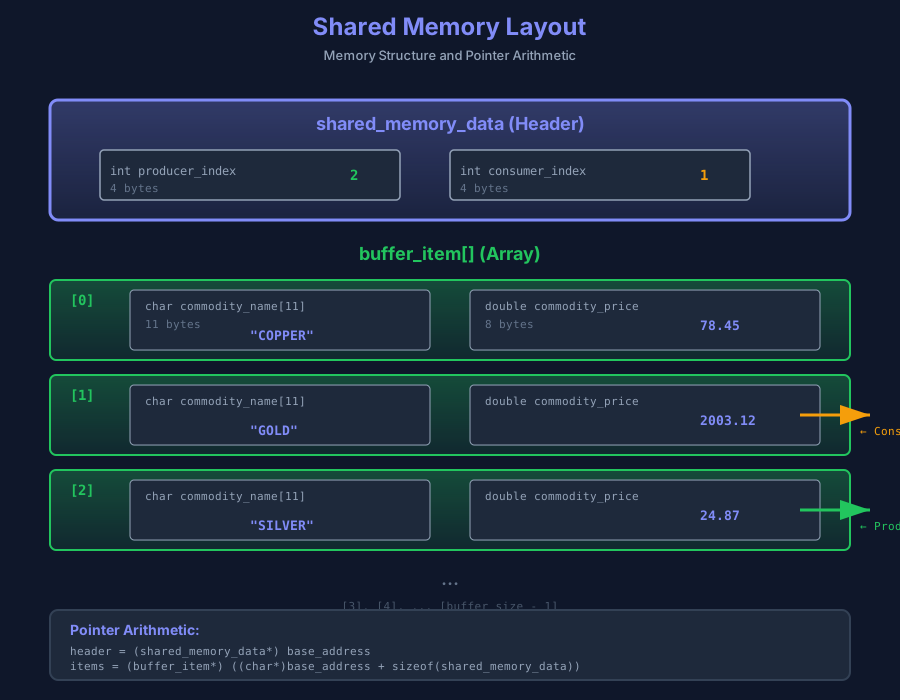
Memory layout showing the header structure (producer_index, consumer_index) followed by the buffer_item array with pointer arithmetic
The Data Structures:
// Header stored at the beginning of shared memory
struct shared_memory_data {
    int producer_index;    // Where producer writes next
    int consumer_index;    // Where consumer reads next
};

// A single item in the buffer
struct buffer_item {
    char name[11];         // Commodity name (max 10 chars + null)
    double price;          // Price value
};
Calculating Total Size:
// Total size = header + (buffer_size × item size)
int size = sizeof(shared_memory_data) + buffer_size * sizeof(buffer_item);
Accessing the Memory:
// Attach to shared memory
void* base = shmat(shmid, NULL, 0);

// The header is at the beginning
shared_memory_data* header = (shared_memory_data*) base;

// The buffer array starts immediately after the header
// We need byte-level pointer arithmetic, so cast to char* first
buffer_item* items = (buffer_item*) ((char*)base + sizeof(shared_memory_data));
Why Cast to (char*)?
This is a crucial point about pointer arithmetic in C:
- When you add to a pointer, C advances by
sizeof(pointed_type)bytes charis exactly 1 byte, so(char*)base + 24advances exactly 24 bytes- If
basewere anint*, adding 24 would advance 24 × 4 = 96 bytes!
By casting to char* before adding sizeof(shared_memory_data), we ensure we
skip
exactly that many bytes.
Complete Example:
// Calculate size and create segment
int size = sizeof(shared_memory_data) + buffer_size * sizeof(buffer_item);
int shmid = shmget(KEY, size, 0666 | IPC_CREAT);

// Attach
void* base = shmat(shmid, NULL, 0);

// Access structures
shared_memory_data* header = (shared_memory_data*) base;
buffer_item* items = (buffer_item*) ((char*)base + sizeof(shared_memory_data));

// Now you can use them:
header->producer_index = 0;
header->consumer_index = 0;
items[0].price = 1850.50;  // Access first buffer item