Part 4: C Programming Essentials
This section covers essential C/C++ programming concepts needed to understand the producer-consumer implementation. Even if you're familiar with C, the IPC-specific patterns (like pointer arithmetic for memory layouts) may be new.
Why This
Matters: IPC programming uses low-level C constructs heavily. Understanding these
concepts
will help you read and modify the code in the code folder.
4.1 Pointers and Memory
What is a Pointer?
A pointer is a variable that stores a memory address. Instead of holding a value
directly (like int x = 42;), a pointer holds the location of where a value is
stored.
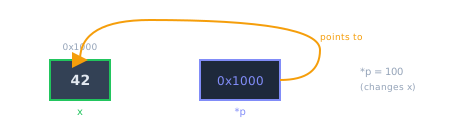
Pointer p stores the address of variable x and can dereference to modify x
Pointer Basics:
int x = 42;          // x is an integer variable holding 42
int *p = &x;         // p is a pointer, & gets the address of x
                     // p now holds something like 0x7fff5fbff8ac

*p = 100;            // Dereference: * accesses the value AT that address
                     // This changes x to 100!
Key operators:
&(address-of) — Gets the memory address of a variable*(dereference) — Accesses the value at a memory address
Why Pointers Matter for IPC:
shmat() returns a pointer to shared memory. You use that pointer to access the shared
data
structure. Understanding pointers is essential for IPC programming.
Pointer Arithmetic:
When you add a number to a pointer, C advances by sizeof(pointed_type) bytes, not just
that
many bytes:
int arr[5] = {10, 20, 30, 40, 50};
int *p = arr;        // Points to arr[0] (address 0x1000, for example)

p++;                 // Now points to arr[1]
                     // Actually moved sizeof(int) = 4 bytes
                     // So p is now 0x1004, not 0x1001!
This is why we cast to char* for byte-level arithmetic in shared memory
layouts—char is exactly 1 byte.
The %p Format Specifier:
To print a pointer address for debugging, use %p with a cast to void*:
printf("Address of x: %p\n", (void*)&x);
// Output: Address of x: 0x7fff5fbff8ac
Why cast to void*? The %p specifier expects a generic pointer. Casting
ensures correctness regardless of what type of pointer you have.
4.2 Structs
What is a Struct?
A struct (structure) groups related variables together under one name. Each variable inside is called a member or field.
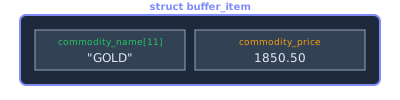
Structure layout showing two fields: commodity name string and price value
Defining and Using Structs:
// Define a struct type
struct buffer_item {
    char commodity_name[11];   // 11-character array (10 chars + null)
    double commodity_price;    // 8-byte floating point
};

// Create and use a struct variable
struct buffer_item item;
strcpy(item.commodity_name, "GOLD");   // Use . to access members
item.commodity_price = 1850.50;
Accessing Members Through Pointers:
When you have a pointer to a struct, use the arrow operator (->) instead of
dot:
struct buffer_item *ptr = &item;

// These are equivalent:
(*ptr).commodity_price = 1900.00;  // Dereference, then access
ptr->commodity_price = 1900.00;    // Arrow operator (preferred)
Why Structs Matter for IPC:
We use structs to define the layout of shared memory. Both producer and consumer must use the same struct definitions to interpret the shared bytes correctly.
4.3 Arrays vs. Pointers
Arrays and pointers are closely related in C, but there are critical differences:
Key Differences:
- Array: A fixed block of memory. The array name represents the starting address but cannot be reassigned.
- Pointer: A variable holding an address. It can be reassigned to point elsewhere.
char name[11];       // Array: allocates 11 bytes, name is fixed
char *ptr;           // Pointer: can point to any char or char array

name = "hello";      // ERROR! Cannot reassign array name
ptr = "hello";       // OK! Pointer now points to string literal

strcpy(name, "hello");  // OK! Copies characters INTO the array
📘 Why "Array = String" Fails:
When you write char name[10]; name = "hello";, the compiler produces:
error: assignment to expression with array typeThis happens because name is not a variable storing an address—it is the
address of a fixed memory block. Arrays cannot be reassigned, only filled with functions like
strcpy() or snprintf().
Array "Decay" — "Acts Like" vs "Is":
A common source of confusion: the name of an array can behave like a pointer in many expressions, but it is NOT actually a pointer. This automatic conversion is called array-to-pointer decay:
int arr[5] = {1, 2, 3, 4, 5};
int *p = arr;        // arr decays to &arr[0]

printf("%d\n", *p);  // Prints 1 (same as arr[0])

// But they are NOT the same:
sizeof(arr);         // Returns 20 (5 ints × 4 bytes)
sizeof(p);           // Returns 8 (pointer size on 64-bit)
Critical Difference in Memory:
- Pointer: A variable with its own memory location that stores an
address.
Can be reassigned (
p = another_address;). - Array: The array IS the memory block itself. There is no separate "box" storing an address. Cannot be reassigned.
Why This Matters:
In the buffer_item struct, commodity_name is an array, not a
pointer.
You must use strcpy() to fill it—you cannot assign directly. This design is intentional
for
shared memory: the actual character data must be stored inside the shared memory block, not
as
a pointer to some external location that other processes cannot access.
4.4 String Functions
C strings are null-terminated character arrays. The standard library provides functions to work with them safely.
strncpy — Safe String Copy:
Copies up to n characters from source to destination:
char dest[11];
strncpy(dest, source, 10);  // Copy up to 10 chars
dest[10] = '\0';            // ALWAYS null-terminate manually!
📘 strncpy Behavior:
- Source shorter than n: Pads the remaining bytes with
'\0'(null characters) - Source longer than n: Copies exactly n characters and does NOT add a null terminator
This is why we always manually add dest[n] = '\0'; to
guarantee null termination regardless of source length.
⚠️ Warning: strncpy() does NOT null-terminate if the source is
longer
than the limit! Always add the null terminator manually.
strcmp — Compare Strings:
if (strcmp(str1, str2) == 0) {
    // Strings are identical
}
// Returns: 0 if equal, negative if str1 < str2, positive if str1 > str2
snprintf — Safe Formatted String:
snprintf stands for string n-print
formatted. Unlike printf(), which writes to the terminal,
snprintf() writes formatted text into a character array in memory:
| Function | Output Destination |
|---|---|
printf("...") |
Terminal (screen) |
snprintf(arr, size, "...") |
Into a string (memory buffer) |
char buffer[100];
snprintf(buffer, sizeof(buffer), "Price: %.2f", 1850.50);
// buffer now contains "Price: 1850.50"

// Compare with printf:
printf("Price: %.2f", 1850.50);  // Displays on screen, doesn't store
The second parameter (sizeof(buffer)) is the maximum bytes to write,
protecting against buffer overflow—a common security vulnerability where writing
beyond
allocated memory causes crashes or exploits.
printf vs fprintf — Output Streams:
Every program has three standard streams provided by the operating system:
| Stream | Purpose | Typical Use |
|---|---|---|
stdin |
Standard input | Keyboard input |
stdout |
Standard output | Normal program results |
stderr |
Standard error | Error messages, warnings, diagnostics |
printf() always writes to stdout. fprintf() lets you choose
the
destination:
printf("Normal output\n");               // Goes to stdout
fprintf(stdout, "Same as printf\n");     // Equivalent to printf
fprintf(stderr, "Error message!\n");     // Goes to stderr
Why use stderr for errors?
When you redirect output to a file, stdout and stderr are separate
channels:
./producer GOLD 2000 5 500 8 > output.txtstdout→ redirected tooutput.txtstderr→ still appears on screen
This separation ensures error messages are always visible, even when normal output is redirected.
Throughout our implementation, we use fprintf(stderr, ...) for all error and diagnostic
messages.
4.5 Argument Parsing
Command-line programs receive arguments through main()'s parameters:
int main(int argc, char *argv[]) {
    // argc = argument count (including program name)
    // argv = array of argument strings

    // Example: ./producer GOLD 2000.0 5.0 500 8
    // argc = 6
    // argv[0] = "./producer"
    // argv[1] = "GOLD"
    // argv[2] = "2000.0"
    // argv[3] = "5.0"
    // argv[4] = "500"
    // argv[5] = "8"
}
Converting String Arguments to Numbers:
// String to integer
int buffer_size = atoi(argv[5]);      // "8" → 8

// String to double
double mean_price = atof(argv[2]);    // "2000.0" → 2000.0
📘 Better Alternatives for Production Code:
atoi() and atof() return 0 on failure without any error indication. For
robust parsing, use strtol() and strtod(), which provide error
detection:
char *endptr;
long value = strtol(argv[1], &endptr, 10);
if (*endptr != '\0') {
    fprintf(stderr, "Error: '%s' is not a valid number\n", argv[1]);
}
4.6 Time Functions
The <time.h> header provides functions for getting and formatting time:
#include <time.h>

// Get current time (seconds since Jan 1, 1970 - "Unix epoch")
time_t current_time = time(NULL);

// Convert to local time structure
struct tm *tm_info = localtime(¤t_time);

// Format as a string
char buffer[20];
strftime(buffer, 20, "%Y/%m/%d %H:%M:%S", tm_info);
// Result: "2025/01/23 14:30:45"
⚠️ Thread-Safety Warning: localtime() uses a static internal
buffer,
making it not thread-safe. If multiple threads call localtime()
simultaneously, they may corrupt each other's results. For multi-threaded programs, use the
reentrant version localtime_r():
struct tm tm_info;
localtime_r(¤t_time, &tm_info);  // Writes to YOUR buffer
Format Specifiers:
%Y— 4-digit year (2025)%m— Month (01-12)%d— Day (01-31)%H— Hour (00-23)%M— Minute (00-59)%S— Second (00-59)
Getting High-Resolution Time with clock_gettime:
For millisecond or nanosecond precision, use clock_gettime():
#include <time.h>

void get_time_with_milliseconds(char* buffer) {
    struct timespec ts;
    clock_gettime(CLOCK_REALTIME, &ts);

    // Convert to local time breakdown
    struct tm* time_info = localtime(&ts.tv_sec);

    char date_buffer[20];
    strftime(date_buffer, 20, "%Y/%m/%d %H:%M:%S", time_info);

    // Append milliseconds (tv_nsec is nanoseconds)
    sprintf(buffer, "%s.%03ld", date_buffer, ts.tv_nsec / 1000000);
}
// Result: "2025/01/23 14:30:45.123"
4.7 Random Number Generation (C++)
The producer generates commodity prices using C++'s modern random number facilities from the
<random> header. All classes in this header are part of the
std
namespace (the C++ Standard Library namespace), which is why we write
std::mt19937 and std::normal_distribution.
Understanding Class Templates:
std::normal_distribution<double> is a class template. The
<double> part tells C++ which numeric type to produce:
std::normal_distribution<float>— producesfloatvaluesstd::normal_distribution<double>— producesdoublevaluesstd::normal_distribution<long double>— produces extended precision values
The generation follows a three-stage pipeline:
📘 Random Number Pipeline:
- Seed Source (
random_device) — Obtains true random bits from hardware entropy - Engine (
mt19937) — Generates uniformly distributed pseudo-random integers - Distribution (
normal_distribution) — Shapes the raw integers into the desired statistical distribution
#include <random>

// Stage 1: Hardware-based entropy source for seeding
std::random_device rd;

// Stage 2: Mersenne Twister engine (period 2^19937-1)
// The "19937" refers to the period of 2^19937-1 — a specific algorithm
std::mt19937 gen(rd());

// Stage 3: Normal (Gaussian) distribution: mean=100, stddev=5
std::normal_distribution<double> dist(100.0, 5.0);

// Generate a random value
double price = dist(gen);  // Returns values like 98.2, 103.7, 95.1...
📘 Deterministic vs Non-Deterministic:
std::random_device provides a (mostly) non-deterministic seed from hardware entropy.
std::mt19937 is deterministic—given the same seed, it produces the
exact same sequence every time. By seeding it with random_device(), we get
different
sequences each program run.
Why Normal Distribution?
Real commodity prices tend to fluctuate around a mean value. A normal distribution (bell curve) models this well—most prices are near the mean, with fewer extreme values.
Handling Negative Values:
Normal distributions can produce negative numbers, but commodity prices can't be negative. Use
std::max() for a clean, idiomatic solution:
#include <algorithm>  // for std::max

double price = std::max(0.01, dist(gen));  // Clamps to minimum 0.01
⚠️ Why Clamping is Necessary: A normal_distribution with mean 100
and
stddev 5 will occasionally produce values like 80 or 120, and very rarely values below 0. Since
commodity prices cannot be negative, you must clamp the output.
4.8 ANSI Escape Codes
ANSI escape codes let you control terminal output—clearing the screen, moving the cursor, and adding colors:
Clear Screen:
printf("\e[1;1H\e[2J");
// \e[1;1H — Move cursor to row 1, column 1
// \e[2J   — Clear entire screen
Move Cursor:
printf("\033[5;10H"); // Move cursor to row 5, column 10Colored Output:
printf("\033[0;32m");   // Switch to green text
printf("Success!");
printf("\033[0m");      // Reset to default color
Common Color Codes:
| Code | Color | Use Case |
|---|---|---|
\033[0;31m |
Red | Errors, price drops |
\033[0;32m |
Green | Success, price increases |
\033[0;33m |
Yellow | Warnings |
\033[0;34m |
Blue | Information |
\033[0m |
Reset | Return to default |
4.9 Sleep Functions
Sleep functions pause execution for a specified duration. They're used to control the producer's output rate:
#include <unistd.h>

// Sleep for specified microseconds (1/1,000,000 second)
usleep(500000);      // Sleep 500,000 μs = 0.5 seconds

// Sleep for specified seconds
sleep(2);            // Sleep 2 seconds

// Convert milliseconds to microseconds:
int ms = 200;
usleep(ms * 1000);   // Sleep 200 ms = 200,000 μs
Interruptible Sleep Pattern:
For responsive signal handling, break long sleeps into small chunks:
// Instead of: usleep(5000000);  // 5 seconds

// Do this: check g_running between chunks
for (int i = 0; i < 500 && g_running; i++) {
    usleep(10000);  // 10ms chunks
}
// Responds to Ctrl+C within 10ms instead of 5 seconds