Part 3: System V Semaphores
This section covers System V semaphores—the synchronization mechanism that prevents race conditions and coordinates access to shared memory. You'll learn how to create semaphores, perform wait/signal operations, and properly initialize and clean them up.
Prerequisites:
Read Core Concepts first to understand what semaphores are conceptually.
The
full implementation is in the code folder.
3.1 What is a Semaphore?
The Concept
A semaphore is an integer variable maintained by the operating system kernel that supports special atomic operations. Unlike regular variables that you can set to any value, semaphores enforce specific rules:
- The value is always non-negative (≥ 0)
- Operations are atomic (cannot be interrupted midway)
- If an operation would make the value negative, the process blocks (sleeps) until the operation can succeed
Why Semaphores Exist
Semaphores solve two fundamental problems in concurrent programming:
- Mutual Exclusion — Ensuring only one process executes a critical section at a time (using binary semaphores, also called "mutexes")
- Resource Counting — Tracking how many units of a resource are available (using counting semaphores)
- Process Signaling — One process telling another "you can proceed now"
Key Properties:
- Semaphore value is never negative — If you try to decrement below 0, you wait instead
- Operations are atomic — The kernel guarantees that P and V operations complete without interruption
- Blocking is efficient — Waiting processes sleep instead of busy-looping, saving CPU
Real-World Analogy
Binary semaphore (mutex): A bathroom lock. The lock is either available (1) or taken (0). If taken, you wait outside the door.
Counting semaphore: A parking garage counter showing available spaces. Each car entering decrements it; each car leaving increments it. When it shows 0, incoming cars must wait.
3.2 P and V Operations
These are the fundamental semaphore operations, named by Dijkstra using Dutch words:
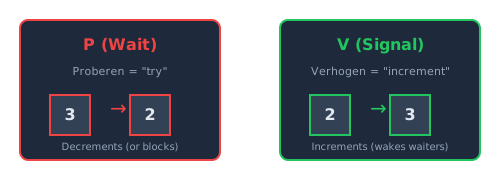
P (wait) decrements the semaphore; V (signal) increments it
P (Proberen = "to test/try") — Wait/Decrement:
The name P comes from the Dutch word proberen, meaning "to test" or "to try." The P operation attempts to "take" a resource. If none is available, the process waits.
// Pseudocode for P(sem):
if (sem > 0) {
    sem = sem - 1;     // Take the resource
} else {
    // Block: go to sleep until sem > 0
    // When woken up, decrement and continue
}
Common names: wait(), down(), acquire(), lock()
V (Verhogen = "to increment") — Signal/Increment:
The name V comes from the Dutch word verhogen, meaning "to increment" or "to raise." The V operation "returns" a resource and potentially wakes a waiting process.
// Pseudocode for V(sem):
sem = sem + 1;         // Return the resource
if (any process is waiting) {
    wake one up;       // Let a waiter proceed
}
Common names: signal(), up(), release(), unlock()
📚 Historical Note: These terms were coined by Dutch computer scientist Edsger Dijkstra in 1965. While English-speaking programmers often use "wait" and "signal," understanding the original Dutch terms helps when reading academic literature and historical documentation.
Key Insight: P and V are abstract operations. In System V IPC, both are implemented
using the single semop() function with positive or negative values.
3.3 The Semaphore Lifecycle
Working with System V semaphores involves these steps:
- Create or Access — Use
semget()to create a semaphore set or get an existing one - Initialize — Use
semctl()withSETVALto set initial values (only needed when creating) - Use — Use
semop()to perform P and V operations - Remove — Use
semctl()withIPC_RMIDto delete
Required Headers:
#include <sys/ipc.h>   // For IPC_CREAT, IPC_RMID
#include <sys/sem.h>   // For semget, semop, semctl
Semaphore Sets
Unlike some other semaphore implementations, System V creates semaphore sets—arrays of multiple semaphores accessed by a single ID. For the producer-consumer problem, we create a set of 3 semaphores:
- Semaphore 0:
mutex - Semaphore 1:
empty - Semaphore 2:
full
3.4 semget() — Create or Access Semaphores
The semget() function creates a new semaphore set or retrieves the ID of an existing
one:
int semget(key_t key, int nsems, int semflg);Parameters Explained:
key— A unique identifier that processes use to find the same semaphore set (similar to shared memory keys)nsems— Number of semaphores in the set. For producer-consumer, we use 3 (mutex, empty, full)semflg— Flags combining creation mode and permissions:IPC_CREAT— Create if it doesn't existIPC_EXCL— Fail if it already exists (with IPC_CREAT)0666— Read/write permissions for all users
Return Value:
- Success: Returns the semaphore set ID (
semid) - Failure: Returns
-1(checkerrno)
Example:
// Create set of 3 semaphores (mutex, empty, full)
int semid = semget(SEMAPHORE_KEY, 3, 0666 | IPC_CREAT);
if (semid == -1) {
    fprintf(stderr, "semget failed: %s\n", strerror(errno));
    exit(EXIT_FAILURE);
}
Consumer vs. Producer:
- Consumer (creates):
semget(KEY, 3, 0666 | IPC_CREAT) - Producer (accesses existing):
semget(KEY, 3, 0)— NoIPC_CREAT
3.5 semop() — Perform Semaphore Operations
The semop() function is the workhorse of semaphore operations—it performs P (wait) and V
(signal) operations:
int semop(int semid, struct sembuf *sops, size_t nsops);Parameters:
semid— The semaphore set ID fromsemget()sops— Pointer to an array of operation structuresnsops— Number of operations in the array
The sembuf Structure:
Each operation is described by a struct sembuf:
struct sembuf {
    unsigned short sem_num;  // Which semaphore in the set (0, 1, 2, ...)
    short          sem_op;   // The operation value
    short          sem_flg;  // Flags (usually 0)
};
Understanding sem_op:
The sem_op field determines what operation to perform. Importantly,
sem_op can be any integer value, not just ±1! The kernel adds or subtracts
the exact amount you specify atomically:
sem_op < 0(e.g., -1, -2, -5) — P operation (wait/decrement)- If semaphore value ≥ |sem_op|, subtract |sem_op| and continue
- Otherwise, block until the value is high enough
- Example:
sem_op = -3means "wait for and take 3 resources at once"
sem_op > 0(e.g., +1, +2, +5) — V operation (signal/increment)- Add sem_op to the semaphore value immediately
- Wake any waiting processes if they can now proceed
- Example:
sem_op = +2means "release 2 resources"
sem_op == 0— Wait until the semaphore becomes exactly zero (rarely used)
📘 sem_op Values Summary:
| sem_op Value | Operation | Effect |
|---|---|---|
-1 |
P (wait) | Decrement by 1 (or block) |
-N |
P (wait for N) | Decrement by N (or block) |
+1 |
V (signal) | Increment by 1 |
+N |
V (signal N) | Increment by N |
0 |
Wait-for-zero | Block until semaphore = 0 |
Common sem_flg Values:
0— Default blocking behaviorIPC_NOWAIT— Return error immediately instead of blockingSEM_UNDO— Automatically undo the operation if process terminates unexpectedly
Helper Function Pattern:
Since raw semop() calls are verbose, most programs define a helper function:
int semaphore_op(int semid, short semnum, short op) {
    struct sembuf operation;
    operation.sem_num = semnum;   // Which semaphore
    operation.sem_op = op;        // -1 for P, +1 for V
    operation.sem_flg = 0;        // Default behavior

    if (semop(semid, &operation, 1) == -1) {
        if (errno == EINTR) {
            // Interrupted by signal - may need to retry
            return -1;
        }
        fprintf(stderr, "semop failed: %s\n", strerror(errno));
        return -1;
    }
    return 0;
}

// Usage examples:
semaphore_op(semid, 0, -1);  // P(mutex) - wait/lock
semaphore_op(semid, 0, +1);  // V(mutex) - signal/unlock
semaphore_op(semid, 1, -1);  // P(empty) - wait for empty slot
semaphore_op(semid, 2, +1);  // V(full)  - signal item available
Blocking Behavior:
When semop() blocks (because sem_op is negative and the value is too low),
the
process goes to sleep. The kernel will wake it when:
- Another process performs a V operation that raises the value enough, OR
- A signal is delivered to the process (returns -1 with
errno = EINTR)
Atomicity of Multiple Operations:
A powerful feature of semop() is that it can perform multiple semaphore
operations
atomically. When you pass an array of operations:
- The kernel tests all operations to see if they can be applied
- If any operation would block, none are applied
- Only when all can succeed do they execute together as one atomic step
Example — Atomic Lock Acquisition:
struct sembuf ops[2];
// Wait for both mutex AND empty slot atomically
ops[0].sem_num = SEM_MUTEX; ops[0].sem_op = -1; ops[0].sem_flg = 0;
ops[1].sem_num = SEM_EMPTY; ops[1].sem_op = -1; ops[1].sem_flg = 0;
semop(semid, ops, 2);  // Both happen together or block together
This atomicity prevents race conditions that could occur if you made separate semop()
calls.
However, in the producer-consumer pattern, we typically use separate calls because
we
want to wait for buffer resources (empty/full) before acquiring the mutex, to avoid
holding the lock while blocked.
3.6 semctl() — Control Semaphores
The semctl() function performs control operations on semaphores—most importantly,
initialization and deletion:
int semctl(int semid, int semnum, int cmd, ...);The union semun:
For some commands, you need to pass additional data via a union semun. On some systems,
you
must define this yourself:
union semun {
    int val;               // For SETVAL: the value to set
    struct semid_ds *buf;  // For IPC_STAT: buffer for status info
    unsigned short *array; // For SETALL/GETALL: array of values
};
What is a Union?
A union is a C construct where all members share the same memory
location.
Unlike a struct where each member has its own space, a union makes all members overlap.
Only one member can hold a valid value at a time, and assigning to one member
overwrites the others:
union semun arg;
arg.val = 5;              // Now val is 5
// arg.buf is undefined garbage - they share memory!

// Demonstration of overwrites:
union Data {
    int i;
    float f;
};
union Data d;
d.i = 10;                  // Store 10
printf("%d\n", d.i);       // Prints: 10
d.f = 3.14;                // Overwrite with a float
printf("%d\n", d.i);       // Prints: garbage (e.g., 1078523331)
📘 Struct vs Union Memory Layout:
- Struct: Members stored sequentially —
[a][b][c]— total size = sum of all members - Union: Members overlap at same address —
[a/b/c]— total size = size of largest member
Analogy: A union is like a single container box that can hold a book OR a laptop OR a cup—but only one at a time. Putting a laptop in removes the book.
Why Does System V Use a Union?
Different semctl() commands need different types of data:
SETVAL— Needs a single integer (val)IPC_STAT— Needs a pointer to a struct (buf)SETALL/GETALL— Needs a pointer to an array (array)
Using a union allows a single parameter to carry whichever data type the current command requires. This is more efficient than having separate functions for each command.
⚠️ Union Pitfall: Only one union member is valid at a time! If you write to
arg.val and then read arg.buf, you'll get garbage data because they
occupy
the same bytes in memory.
Initializing Semaphores (SETVAL):
After creating semaphores with semget(), you must initialize them to their starting
values:
union semun arg;

// Initialize mutex to 1 (unlocked)
arg.val = 1;
if (semctl(semid, 0, SETVAL, arg) == -1) {
    fprintf(stderr, "Failed to init mutex: %s\n", strerror(errno));
}

// Initialize empty_slots to buffer_size
arg.val = buffer_size;  // e.g., 8
if (semctl(semid, 1, SETVAL, arg) == -1) {
    fprintf(stderr, "Failed to init empty: %s\n", strerror(errno));
}

// Initialize available_products to 0 (buffer starts empty)
arg.val = 0;
if (semctl(semid, 2, SETVAL, arg) == -1) {
    fprintf(stderr, "Failed to init full: %s\n", strerror(errno));
}
Removing Semaphore Set (IPC_RMID):
// Remove the entire semaphore set
if (semctl(semid, 0, IPC_RMID) == -1) {
    fprintf(stderr, "Failed to remove semaphores: %s\n", strerror(errno));
}
// Note: semnum (the second parameter) is ignored for IPC_RMID
Common semctl Commands:
| Command | Purpose |
|---|---|
SETVAL |
Set value of one semaphore |
GETVAL |
Get current value of one semaphore |
SETALL |
Set values of all semaphores in the set |
GETALL |
Get values of all semaphores in the set |
IPC_STAT |
Get status information about the semaphore set |
IPC_SET |
Set permissions on the semaphore set |
IPC_RMID |
Remove the semaphore set from the kernel |
3.7 Producer-Consumer with Semaphores
Now let's see how all the pieces fit together. Here's how the three semaphores coordinate the producer and consumer:
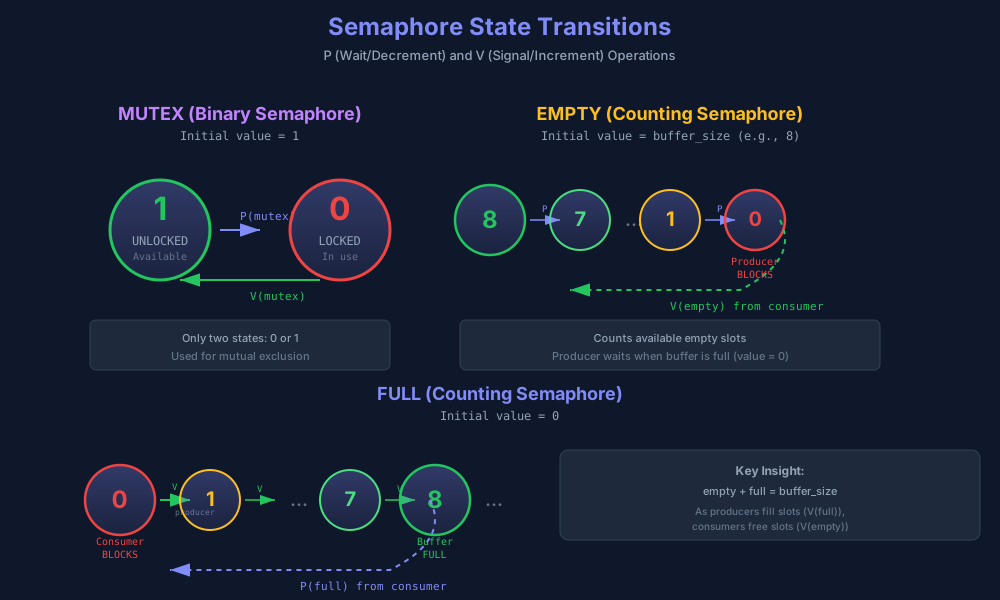
State transitions for the three semaphores: mutex (binary), empty slots (counting down), and full slots (counting up)
Semaphore Indices:
#define MUTEX              0   // Binary: protects critical section
#define EMPTY              1   // Counting: empty slots available
#define FULL               2   // Counting: items ready for consumption
Producer Loop:
while (running) {
    produce_item();                           // Generate data

    semaphore_op(semid, EMPTY, -1);           // P(empty) - wait for slot
    semaphore_op(semid, MUTEX, -1);           // P(mutex) - enter critical section

    place_item_in_buffer();                   // Write data

    semaphore_op(semid, MUTEX, +1);           // V(mutex) - exit critical section
    semaphore_op(semid, FULL, +1);            // V(full)  - signal item available
}
Consumer Loop:
while (running) {
    semaphore_op(semid, FULL, -1);            // P(full)  - wait for item
    semaphore_op(semid, MUTEX, -1);           // P(mutex) - enter critical section

    remove_item_from_buffer();                // Read data

    semaphore_op(semid, MUTEX, +1);           // V(mutex) - exit critical section
    semaphore_op(semid, EMPTY, +1);           // V(empty) - signal slot available

    consume_item();                           // Process data
}
Why This Order Works:
- Wait for resource first: P(empty) or P(full) comes before P(mutex). This prevents holding the lock while waiting for buffer space.
- Hold mutex briefly: The mutex is held only during the actual buffer modification, not during data generation or processing.
- Signal after releasing mutex: V(full) and V(empty) come after V(mutex), allowing the woken process to immediately acquire the mutex.
Tracing an Example:
Assume buffer_size = 3, initially empty:
Initial state: mutex=1, empty=3, full=0

Producer 1 produces item A:
  P(empty): empty 3→2
  P(mutex): mutex 1→0
  [writes A to slot 0]
  V(mutex): mutex 0→1
  V(full):  full 0→1
  State: mutex=1, empty=2, full=1

Consumer reads item A:
  P(full):  full 1→0
  P(mutex): mutex 1→0
  [reads A from slot 0]
  V(mutex): mutex 0→1
  V(empty): empty 2→3
  State: mutex=1, empty=3, full=0