Part 6: Common Pitfalls and Best Practices
System V IPC has several "gotchas" that trip up even experienced developers. This section covers the most common mistakes and shows you the patterns to avoid them.
Prerequisites: Understanding of shared memory and semaphore basics from previous sections.
6.1 Error Checking
Why Error Checking Matters
System calls can fail for many reasons: insufficient permissions, resource limits, invalid arguments, or another process already removed the resource. Production code must always check return values.
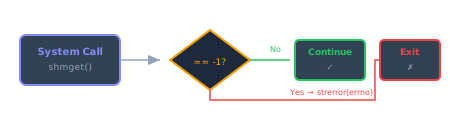
System call error checking pattern showing decision flow and error handling
The errno + strerror Pattern
When a system call fails, it returns an error indicator (-1 or a specific value like
(void*)-1). The reason for failure is stored in the global variable
errno.
📘 What is errno?
errno is a global integer variable (from <errno.h>) that the
operating system sets when a system call fails. Think of it as a "mailbox" where the OS drops
the
reason for failure. However, errno is just a number (like 2). To
convert
it to a human-readable message (like "No such file or directory"), use
strerror(errno)
from <string.h>.
#include <errno.h>    // Defines errno
#include <string.h>   // Defines strerror()

int shmid = shmget(KEY, size, 0666 | IPC_CREAT);
if (shmid == -1) {
    // errno now contains the error code (e.g., ENOENT, EACCES, EINVAL)
    // strerror(errno) converts it to a human-readable message
    fprintf(stderr, "Error: shmget failed: %s\n", strerror(errno));
    exit(EXIT_FAILURE);
}

void *addr = shmat(shmid, NULL, 0);
if (addr == (void *)-1) {    // Note: NOT addr == -1
    fprintf(stderr, "Error: shmat failed: %s\n", strerror(errno));
    exit(EXIT_FAILURE);
}
Common Error Codes:
| errno | Meaning |
|---|---|
ENOENT |
Resource doesn't exist (consumer not running?) |
EACCES |
Permission denied |
EEXIST |
Resource already exists (when using IPC_CREAT | IPC_EXCL) |
EINVAL |
Invalid argument (wrong size, bad ID) |
EINTR |
Interrupted by signal (retry the call) |
⚠️ Check Immediately!
Always check errno right after the system call. Other code (even successful calls)
can
overwrite errno.
6.2 Signal Handling for Graceful Cleanup
IPC resources persist in the kernel even after your program exits! Use signal handlers to clean up on Ctrl+C:
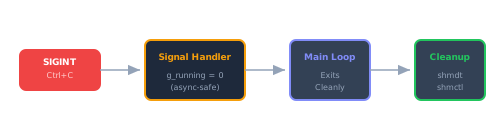
Signal handling workflow for graceful IPC cleanup on Ctrl+C
#include <signal.h>

static volatile sig_atomic_t g_running = 1;

void signal_handler(int signum) {
    (void)signum;
    g_running = 0;  // Signal main loop to exit
}

int main() {
    // Install signal handler
    struct sigaction sa;
    sa.sa_handler = signal_handler;
    sigemptyset(&sa.sa_mask);
    sa.sa_flags = 0;  // No SA_RESTART

    sigaction(SIGINT, &sa, NULL);   // Ctrl+C
    sigaction(SIGTERM, &sa, NULL);  // kill command

    while (g_running) {
        // Main loop
    }

    cleanup_resources();
    return 0;
}
Handling EINTR in Semaphore Operations:
What is EINTR?
When a process is blocked in a system call (like semop() waiting on a semaphore) and a
signal is delivered to that process, the system call may be
interrupted. When this happens:
- The system call returns
-1 errnois set toEINTR(Error: Interrupted system call)- The operation was not completed — you must retry it
Why does this matter?
In our producer-consumer program:
- We install signal handlers for
SIGINT(Ctrl+C) andSIGTERM - When a signal arrives,
semop()is interrupted - We need to check if the interruption means "exit requested" or just a spurious signal
The Retry Pattern:
int my_semaphore_operation(int semid, short semnum, short op) {
    struct sembuf operation;
    operation.sem_num = semnum;
    operation.sem_op = op;
    operation.sem_flg = 0;

    while (semop(semid, &operation, 1) == -1) {
        if (errno == EINTR) {
            // System call was interrupted by a signal
            if (!g_running) return -1;  // Exit requested by signal handler
            continue;  // Spurious interrupt, retry the operation
        }
        // Real error (not EINTR)
        fprintf(stderr, "Error: semop failed: %s\n", strerror(errno));
        return -1;
    }
    return 0;
}
How it works:
- Call
semop()in a loop - If it returns
-1, checkerrno - If
errno == EINTR, the call was interrupted:- Check
g_runningflag (set by signal handler) - If
g_running == 0, exit gracefully (user pressed Ctrl+C) - Otherwise, retry the
semop()call
- Check
- If
errnois something else, it's a real error
Critical: Semaphore State Rollback
The implementation includes an important safety feature: semaphore state rollback on interruption. Consider this scenario:
- Producer calls
P(empty)— succeeds, decrementsempty_slots - Producer calls
P(mutex)— interrupted by Ctrl+C - If we simply exit,
empty_slotsis permanently decremented!
The solution:
// Wait for empty slot
if (my_semaphore_operation(semaphore_id, empty_slots, -1) == -1) {
    if (!g_running) break;  // Clean exit - semaphore state is OK
    break;  // Error - but no rollback needed (operation failed)
}

// Try to acquire mutex
if (my_semaphore_operation(semaphore_id, mutual_exclusion, -1) == -1) {
    // CRITICAL: We already decremented empty_slots, must restore it!
    if (my_semaphore_operation(semaphore_id, empty_slots, +1) == -1) {
        fprintf(stderr, "Warning: Failed to restore semaphore\n");
    }
    if (!g_running) break;  // Clean exit
    break;  // Error
}
This rollback pattern ensures:
- Semaphore state remains consistent even when interrupted
- No orphaned decrements that could cause deadlocks
- Clean shutdown in all scenarios
The actual implementation in code/ includes this rollback logic for both
producer
and consumer.
Signal-Safe Programming:
The g_running flag must be volatile sig_atomic_t to ensure:
- Changes are visible across signal handler and main code
- Reads/writes are atomic (cannot be interrupted mid-operation)
static volatile sig_atomic_t g_running = 1;

void signal_handler(int signum) {
    (void)signum;
    g_running = 0;  // Signal the main loop to exit
}
This pattern ensures clean shutdown: when the user presses Ctrl+C, the signal handler sets
g_running = 0, the EINTR check detects this, semaphore state is restored
if
needed, and the process exits gracefully after cleaning up IPC resources.
6.3 Resource Cleanup Commands
Why You Need These
If your program crashes, is killed with kill -9, or exits without proper cleanup, the
IPC
resources remain in the kernel. You'll see errors like "Resource already exists" on the next run.
Use
these commands to inspect and clean up:
Inspection Commands:
# List all IPC resources for current user
ipcs

# List only shared memory segments
ipcs -m

# List only semaphore sets
ipcs -s

# Show more details (size, permissions, last access)
ipcs -a
Removal Commands:
# Remove shared memory by ID (get ID from ipcs -m)
ipcrm -m <shmid>

# Remove shared memory by KEY
ipcrm -M <key>

# Remove semaphore set by ID
ipcrm -s <semid>

# Remove semaphore set by KEY
ipcrm -S <key>

# Remove all IPC resources for current user (careful!)
ipcrm -a
Quick Cleanup Script:
#!/bin/bash
# cleanup_ipc.sh - Remove orphaned resources from our application
ipcrm -M 777 2>/dev/null  # Shared memory key
ipcrm -S 555 2>/dev/null  # Semaphore key
echo "IPC resources cleaned up (if they existed)"
6.4 Order of Semaphore Operations
The Deadlock Trap
One of the most common mistakes in producer-consumer implementations is acquiring semaphores in the wrong order. This can cause deadlock—where two or more processes wait forever for each other.
❌ WRONG (causes deadlock):
// Producer - WRONG ORDER
P(mutex);        // Acquire mutex first
P(empty);        // Then wait for empty slot
// ...
V(mutex);
V(full);

// Consumer - WRONG ORDER
P(mutex);        // Acquire mutex first
P(full);         // Then wait for product
// ...
Why This Deadlocks:
- Buffer is full (empty = 0, full = 8)
- Producer acquires mutex → holds it
- Producer waits on
P(empty)→ blocks (empty = 0) - Consumer tries to acquire mutex → blocks (producer holds it)
- Deadlock! Producer waits for consumer to free a slot, consumer waits for producer to release mutex
✅ CORRECT:
// Producer - CORRECT ORDER
P(empty);        // Wait for empty slot first (might block)
P(mutex);        // THEN acquire mutex (quick operation)
// ... write to buffer ...
V(mutex);
V(full);

// Consumer - CORRECT ORDER
P(full);         // Wait for product first (might block)
P(mutex);        // THEN acquire mutex (quick operation)
// ... read from buffer ...
V(mutex);
V(empty);
🔑 Golden Rule: Always acquire the resource-counting semaphore (empty/full) before the mutex semaphore!
This ensures you never hold the mutex while blocked waiting for resources.
6.5 Buffer Size Mismatch
The Problem
The producer and consumer must use the same buffer size. The buffer size affects:
- Total shared memory size:
sizeof(header) + buffer_size * sizeof(item) - Semaphore initial values:
empty_slots = buffer_size - Index wraparound:
index = (index + 1) % buffer_size
What Happens With Mismatch:
# Consumer creates buffer with 8 slots
./consumer 8

# Producer thinks buffer has 16 slots - DISASTER!
./producer GOLD 2000 5 500 16- Producer writes beyond allocated memory → memory corruption
- Indices wrap at different points → data overwritten or skipped
- Semaphore values don't match reality → buffer overflow/underflow
Solution: Validate at Runtime
Pass buffer size as a command-line argument to both programs and use the same value:
# Always use the same value for both
./consumer 8
./producer GOLD 2000 5 500 8
./producer SILVER 25 0.5 300 8
⚠️ No Automatic Validation
System V IPC doesn't enforce size matching. The producer simply trusts that the shared memory is the right size. Double-check your command-line arguments!
6.6 Negative Prices from Normal Distribution
Understanding the Issue
The normal (Gaussian) distribution can theoretically produce any real number from -∞ to +∞. While most values cluster near the mean, extreme values are possible—including negative ones:
std::normal_distribution dist(2000.0, 5.0);
// Mean = 2000, StdDev = 5
// 99.7% of values fall within 3 standard deviations: 1985 to 2015
// But ~0.3% can be outside this range
// With large StdDev or low mean, negatives are more likely
The Fix: Price Floor
double price = price_distribution(generator);
if (price < 0.01) {
    price = 0.01;  // Minimum price floor (1 cent)
}
This ensures commodity prices are never negative or zero, which would be invalid in a real trading system.
6.7 IPC Key Conventions
Key Format Options
IPC keys are just integers, but they can be specified in different formats:
#define SHARED_MEMORY_KEY 777      // Decimal
#define SEMAPHORE_KEY     0x309    // Hexadecimal (equals 777 in decimal)
Both formats work identically because they represent the same integer value:
777(decimal) =0x309(hexadecimal)- The
0xprefix tells the compiler to interpret the number as hexadecimal
Why Hexadecimal is Preferred
While any integer works (even small values like 1 or 2),
hexadecimal
keys like 0x12345 are conventional for several reasons:
- Reduces collision risk: Small keys like
1or2are likely to be used by other programs or test code running on the same system. System V IPC keys are global across the entire system, so collisions cause hard-to-debug errors. - Visual distinction: Hexadecimal keys are immediately recognizable as IPC identifiers in code (vs. magic numbers)
- Industry convention: Most tutorials and production code use hex keys
Key Equivalence Examples:
// These are identical:
#define KEY1 74565      // Decimal
#define KEY2 0x12345    // Hexadecimal

printf("%d %d\n", KEY1, KEY2);  // Prints: 74565 74565
Collision Risk Example:
Bad practice:
#define SHM_KEY 1
#define SEM_KEY 2
Risk: Another program on the system might use keys 1 and 2, causing your
program to attach to the wrong IPC objects or fail with "already exists" errors.
Good practice:
#define SHM_KEY 0x7FA1B234  // Unlikely to collide
#define SEM_KEY 0x7FA1B235
The ftok() Alternative:
For production systems, consider using ftok() to generate keys from a file path:
key_t key = ftok("/tmp/myapp", 'A');
if (key == -1) {
    perror("ftok failed");
    exit(1);
}
int shmid = shmget(key, size, 0666 | IPC_CREAT);
This generates a key based on the file's inode, reducing collision risk.
Bottom Line:
- Keys are just integers (decimal and hex are equivalent)
- Use larger values (hex like
0x12345or decimal > 1000) to avoid collisions - Be consistent between producer and consumer
- Hexadecimal is conventional but not required
6.8 Understanding IPC Resource Cleanup: Detach vs Remove
A common source of confusion is the difference between detaching from IPC resources and removing them from the system.
shmdt() — Detach Shared Memory
shmdt(shared_memory_address);What it does:
- Removes the mapping of shared memory from this process's address space only
- The pointer becomes invalid for this process
- The shared memory segment itself continues to exist in the kernel
Analogy: You leave a shared conference room, but the room itself remains available for others.
shmctl(shmid, IPC_RMID, NULL) — Remove Shared Memory
shmctl(shmid, IPC_RMID, NULL);What it does:
- Marks the shared memory segment for deletion
- The segment is removed from the system when the last process detaches
- If no processes are attached, it's removed immediately
Analogy: You demolish the conference room entirely.
Why Are They Separate?
This two-phase cleanup exists for safety and coordination:
- Multiple processes can detach independently without destroying data for others
- The last process can safely remove the segment
- Clean shutdown sequence: All processes detach (
shmdt), then one process removes (IPC_RMID)
Typical Workflow:
Producer (connecting to existing resources):
void* addr = shmat(shmid, NULL, 0);
// ... use shared memory ...
shmdt(addr);  // Detach when done (does NOT delete)
// Producer does NOT call IPC_RMID
Consumer (creates and manages resources):
int shmid = shmget(key, size, 0666 | IPC_CREAT);
void* addr = shmat(shmid, NULL, 0);
// ... use shared memory ...
shmdt(addr);                         // Detach
shmctl(shmid, IPC_RMID, NULL);       // Remove from system
Critical Point:
Even if the last attached process calls shmdt(), the segment remains in the
kernel
until IPC_RMID is called!
This is why orphaned IPC objects persist after crashes. Always use signal handlers to ensure
IPC_RMID is called during cleanup.
The Same Applies to Semaphores:
semctl(semid, 0, IPC_RMID); // Remove semaphore set from systemNo "detach" operation for semaphores — you just remove the set when done.
Verification:
After cleanup, verify IPC objects are gone:
ipcs -m  # List shared memory segments
ipcs -s  # List semaphore sets
If your objects still appear, they're orphaned and must be manually removed with ipcrm.
6.9 Standard Output vs Standard Error
When printing messages from your IPC programs, understanding the difference between
stdout and stderr is essential for proper diagnostics and logging.
The Two Output Streams:
| Stream | Function | Buffering | Use Case |
|---|---|---|---|
stdout |
printf() |
Line-buffered | Normal program output |
stderr |
fprintf(stderr, ...) |
Unbuffered | Error messages |
Why This Matters:
// Normal output - goes to stdout (line-buffered)
printf("Processing item %d\n", item_id);

// Error messages - go to stderr (unbuffered, immediate)
fprintf(stderr, "Error: semop failed: %s\n", strerror(errno));
Key differences:
- Buffering:
stdoutis line-buffered, meaning output is held until a newline or buffer fills.stderris unbuffered — output appears immediately. - Crash visibility: If your program crashes, buffered
stdoutcontent may be lost.stderroutput is always visible. - Redirection: Users can redirect
stdoutto a file while still seeing errors:./program > output.log(errors still appear on screen)
📘 Best Practice: Use fprintf(stderr, ...) for all error messages,
and
printf() for normal program output. This ensures errors are immediately visible
even if
stdout is redirected or the program crashes.
6.10 Unicode in Terminal Output
Modern terminals support Unicode characters like arrows (↑, ↓), but C/C++ requires careful handling of multi-byte characters.
The Problem with Single Characters:
// WRONG: Won't compile or produces garbage
char up = '↑';     // Error: character constant too long for type 'char'

// This is because '↑' is encoded as 3 bytes in UTF-8:
// E2 86 91 (hex) = 226 134 145 (decimal)
The Correct Approach — String Literals:
// CORRECT: Use string literals for multi-byte characters
const char* up_arrow = "↑";    // Works fine
const char* down_arrow = "↓";  // Works fine

printf("Price %s %.2f\n", up_arrow, price);  // Prints: Price ↑ 1850.00
📘 Why This Works: String literals ("↑") can hold any UTF-8
sequence
because they're character arrays, not single char values. The compiler stores the
multi-byte sequence and a null terminator automatically.
Terminal Compatibility:
Most modern terminals (xterm, GNOME Terminal, iTerm2, Windows Terminal) support UTF-8 by default. If you see garbled output:
- Check terminal encoding settings (should be UTF-8)
- Ensure your source file is saved as UTF-8
- Set locale in your program if needed:
setlocale(LC_ALL, "");